What I Actually Did During My Software Engineering Internship
Three months of building internal tools, automating workflows, and learning how software gets made

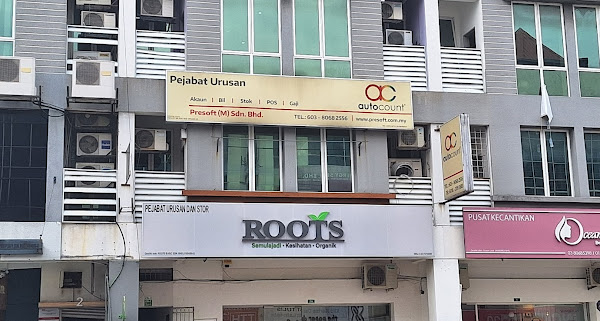
What I Actually Did During My Internship
When I accepted my internship at Presoft, I expected something fairly typical.
The offer letter listed my role as:
- System Support
- Web Designer
- Web Developer
- Digital Marketing
Looking at that list, my first thought was...
"There's no way they're expecting the intern to do all of that..."
Turns out...
...they kind of were.
Going into the internship, I imagined it'd be something like this.
Maybe I'd fix a few bugs.
Maybe I'd implement a couple of small features.
Maybe I'd spend three months reading someone else's code.
Or, in the rare scenario...
...become the office barista.
Instead, every few weeks I was handed something completely different.
By the end of the internship, I'd worked on payment gateways, reporting systems, automation software, database tools, Power BI dashboards, API integrations, and even trained staff to use software I'd written.
Looking back, here's how the internship unfolded.
Week 1 — "Research Some Payment Gateways."
My very first task sounded simple.
Compare some payment gateways.
I thought this meant comparing transaction fees.
It wasn't.
I spent the week researching APIs, settlement times, FPX support, documentation quality, sandbox environments, and plugin compatibility.
The list eventually grew to include:
- Stripe
- Billplz
- iPay88
- eGHL
- SenangPay
- Fiuu
- Razorpay
- Curlec
- Boost
- PayEx
After presenting my findings, my supervisor simply said,
"Can you get more information?"
So I started emailing payment providers directly. This was also my first time cold-emailing companies to ask for information directly. Prior to this I just took whatever I could gather from the internet.
That was my first lesson:
Sometimes Google doesn't have all the answers.
With that in mind, this gave me more self confidence to do more cold emails.
Week 2 — My First Real Development Task
Next came something much more technical.
I was asked to build a utility that copied MySQL tables between databases.
It sounded like a two-day task. It wasn't.
I spent days learning:
- MySQL Workbench
- C#
- WinForms
- Database connections
- Database schema differences
Eventually it worked.
Then people started testing it.
Then I discovered something important.
Making software work is only half the job.
Making it usable is the other half.
Week 3–4 — Reading Someone Else's Code
I was then given an existing integration project between EMAS and AutoCount.
Unlike university assignments...
There wasn't a nice specification.
There wasn't a clean architecture.
There wasn't documentation.
There wasn't even a README.
There was just code.
Lots of it.
Over the next two weeks I gradually improved:
- Connection handling
- Input validation
- Configuration persistence
- Fallback database logic
- User interface behaviour
I also helped test an AutoCount plugin, wrote test plans, reported bugs, and learned how quality assurance fits into a software development cycle.
As with the integration project, there wasn't much documentation.
No README.
No testing guide.
No example workflows.
So I did what every developer eventually has to do.
Click around.
Break things.
Figure out how it was supposed to work.
By the end of the testing phase, I ended up writing documentation of my own so future developers (or interns) wouldn't have to start from zero.
One thing quickly became obvious.
Maintaining existing software is often harder than writing something from scratch, especially if it does not have any prior documentation.
Week 5 — "Can We Automate This Report?"
This accidentally became my biggest project.
The company generated an MDEC digitalisation report every month.
The process involved:
- Opening multiple Excel files
- Searching company websites
- Looking up information manually
- Copying data into templates
- Formatting everything before submission
Naturally, my first thought was:
"Surely ChatGPT can just do this..."
So...
I tried.
It worked...
...for about five minutes.
Then reality kicked in.
The report needed deterministic output.
Every company had to end up in exactly the right column.
Every month had to produce the same structure.
Some companies were missed.
Some fields were hallucinated.
Some information simply couldn't be verified online, and messaging individual companies for their details is... "why are you asking me for these information" (proceeds to cut deals with my company).
Great for brainstorming.
Not so great when someone has to submit the report to MDEC.
So I went back to doing what programmers do best.
Automate it properly.
Version 1 was basically:
- Selenium
- Pandas
- Excel generation
Nothing fancy.
Just enough to prove the idea worked.
Then every presentation went roughly like this.
"Looks good."
"...can we also make it do this?"
Which, translated into developer language, means:
"Congratulations. Version 2 starts tomorrow."
Week 6–8 — The Project Kept Growing
Originally, every company was scraped from the web.
Then someone handed me a folder containing several previous Excel reports.
My immediate reaction was...
"...why am I scraping the internet if we've literally done this before?"
So Version 2 stopped assuming every company was brand new.
Instead it worked like this:
- Search historical reports.
- Reuse existing information.
- Only scrape the web if the company couldn't be found.
That single idea made the tool noticeably faster.
After that I kept asking myself the same question.
"What's another repetitive thing the admin team has to do?"
That led to:
- Automatic state matching
- Industry sector matching
- Digitalisation area matching
- Configuration files
- Standalone executable packaging
Every week I removed another small piece of manual work.
By the end, the application wasn't just scraping websites anymore.
It had become an actual reporting pipeline.
Week 9–10 — Finally, Database Access
Just when I thought I was done...
I finally received access to the company's internal database.
At that point I had one thought.
"Wait... I don't need to scrape this anymore."
So Version 3 was born.
Instead of hunting for missing contact information online, the program could retrieve it directly using SQL queries and APIs.
The workflow eventually became:
Raw Excel File
      │
      ▼
Historical Reports
      │
      ▼
Internal Database
      │
      ▼
API Lookup
      │
      ▼
Website Scraping (only if everything else failed)
      │
      ▼
Formatted Excel Report
By this point, web scraping had become the exception instead of the default.
Watching the "Website Scraping" box slowly move further and further down the pipeline was oddly satisfying.
Every optimisation meant one less thing that could fail.
Less scraping meant fewer CAPTCHAs, fewer broken websites, and faster report generation.
Good software, in my opinion, is the software that does less work over time.
Even better, before my internship ended, I got to demonstrate the software to the admin team and explain how everything worked.
I may have gone into a little too much technical detail at times...
Old habits die hard when you're a Computer Science student.
Week 11–13 — Reports Everywhere
Towards the end of my internship, I started another major project.
This one focused on report generation rather than report automation.
The goal was simple:
Allow staff to generate reports without writing SQL.
I built a desktop application that could:
- Connect to SQL Server
- Execute parameterised queries
- Apply user-selected filters
- Generate HTML reports
- Export Excel reports
- Remember previous settings
Later, I connected the same database to Power BI using DirectQuery so that management could access live dashboards without manually exporting data.
One thing became increasingly clear.
The SQL wasn't actually the hardest part.
The meetings were.
Every person seemed to have a slightly different idea of what a "useful report" looked like. Various higher ups asks for different versions of what they want from the report. Even putting everyone in the same meeting room didn't magically produce one agreed-upon report.
Every meeting introduced another request.
"Can we group it by agent?"
"What about customer instead?"
"Can we show totals?"
"Can we hide totals?"
At one point I realised I wasn't building one report.
I was building a report generator.
Writing the query was easy.
Figuring out which query or style people actually wanted was the challenge.
Along the Way...
There were also plenty of smaller projects.
During the internship I also:
- Tested AutoCount plugins and documented bugs
- Built API demonstrations for Stripe and Billplz
- Worked with Zoho Bigin APIs
- Developed Selenium automation tools
- Generated Power BI dashboards
- Compared Warehouse Management Systems
- Participated in marketing meetings
- Helped prepare presentation materials
- Trained end users to use software I had developed
No two weeks were ever the same.
What Changed The Most
Before starting the internship, I imagined software engineering looked something like this.
Receive Task
    │
    ▼
Write Code
    │
    ▼
Finished
Three months later...
It looked much more like this.
Receive Vague Requirement
          │
          ▼
Ask Questions
          │
          ▼
Misunderstand Requirement
          │
          ▼
Build Prototype
          │
          ▼
Present Progress
          │
          ▼
Requirement Changes
          │
          ▼
Rewrite Half The Project
          │
          ▼
Test Everything
          │
          ▼
Fix Bugs
          │
          ▼
Users Want Another Feature
          │
          ▼
Repeat
And honestly...
That's probably a much more accurate representation of real software engineering.
Final Thoughts
Looking back, I didn't just learn C#, SQL Server, MySQL, Selenium, Power BI, REST APIs, or WinForms. Those are just tools.
I learned how software is actually developed inside a company, learning how requirements evolve.
University teaches you how to build software.
Industry teaches you why the software needs to exist in the first place.
Understanding the business problem turned out to be just as important as writing the code that solved it.
And that's probably the biggest lesson I took away from the internship.